Setting up WPBrowser on Bedrock
May 16, 2016
A test environment built on rock.
A solid foundation
The WordPress open-source ecosystem and its flexibility allow for the existence of "starter" code in many forms.
Starter themes, starter plugins (or "plugin boilerplates"), starter stacks and so on.
The purpose is to give developers a pre-digested, tested and thought-out starting point for themes, plugins or entire WordPress installations.
Bedrock falls into the last category and while I've still not used it I've been asked if wp-browser supports it.
My thought was "yes", turned out to be "yes, with some tweaks".
The standard setup
To be able to test a plugin or theme developed as part of a Bedrock WordPress installation I've followed the instructions that can be found on Bedrock GitHub page and was ready to run in 2 minutes.
My local setup will serve the website on http://bedrock.dev and the root folder will live in ~/Sites/bedrock.
I've scaffolded a plugin in the /web/app/plugins folder called my-plugin that contains the plugin.php file only and proceeded to a composer install.
The only package required by the plugin will be lucatume/wp-browser and the Composer configuration per se has nothing strange in it.
When Composer finished pulling in all the required packages I've scaffolded the tests structure using
wpcept bootstrap
and found myself with the usual starter configuration.
Where things will differ
The evolution of wp-browser has happened, for the most part, through non standard WordPress installations.
To take into account this jungle of possibilities I have, over time and tears, put in place some safety nets to allow for varying WordPress setup to still run as intended.
My local codeception.yml file reads like this
actor: Tester
paths:
    tests: tests
    log: tests/_output
    data: tests/_data
    helpers: tests/_support
settings:
    bootstrap: _bootstrap.php
    colors: true
    memory_limit: 1024M
modules:
    config:
        Db:
            dsn: 'mysql:host=127.0.0.1;dbname=bedrock'
            user: root
            password: root
            dump: tests/_data/dump.sql
        WPBrowser:
            url: 'http://bedrock.dev'
            adminUsername: admin
            adminPassword: admin
            adminUrl: /wp/wp-admin
        WPDb:
            dsn: 'mysql:host=127.0.0.1;dbname=bedrock'
            user: root
            password: root
            dump: tests/_data/dump.sql
            populate: true
            cleanup: true
            url: 'http://bedrock.dev'
            tablePrefix: wp_
        WPLoader:
            wpRootFolder: ~/Sites/bedrock/web/wp
            dbName: bedrock-tests
            dbHost: 127.0.0.1
            dbUser: root
            dbPassword: root
            wpDebug: true
            dbCharset: utf8
            dbCollate: ''
            tablePrefix: wp_
            domain: bedrock.dev
            adminEmail: admin@bedrock.dev
            title: 'WP Tests'
            phpBinary: php
            language: ''
            configFile: test-config.php
            plugins:
              - my-plugin/plugin.php
            activatePlugins:
              - my-plugin/plugin.php
        WPWebDriver:
            url: 'http://bedrock.dev'
            browser: phantomjs
            port: 4444
            restart: true
            wait: 2
            adminUsername: admin
            adminPassword: admin
            adminUrl: /wp/wp-admin
What's to note?
-
the
adminUrlparameter inWPWebDriverandWPBrowsermodules reflects Bedrock file structure: WordPress is installed in the/web/wpfolder -
as usual
DbandWPDbmodules are targeting a database that's not the same theWPLoadermodule uses; this is not particular to Bedrock but this one detail is the one coming up often in support requests -
the
WPLoadermodule is set to load (see thepluginsparameter) and activate (see theactivatePluginsparameter) the plugin (my-plugin/plugin.php) -
the
WPLoadermodule is also instructed to load a customtest-config.phpfile to play nice with the particular Bedrock setup -
the acceptance suite is configured to use the
WPDbmodule and reads like this:# Codeception Test Suite Configuration # suite for WordPress acceptance tests. # perform tests in browser using WPBrowser or WPWebDriver modules. class_name: AcceptanceTester modules: enabled: - WPBrowser - WPDb - \Helper\Acceptance
test-config file
The WPLoader module is a wrapper around the Core test suite and as such will bootstrap WordPress using it's own pseudo wp-config.php and procedure; the WordPress installation wp-config.php file will not be read at all.
Bedrock /web/wp-config.php file reads like this:
<?php
/**
 * Do not edit this file. Edit the config files found in the config/ dir instead.
 * This file is required in the root directory so WordPress can find it.
 * WP is hardcoded to look in its own directory or one directory up for wp-config.php.
 */
require_once(dirname(__DIR__) . '/vendor/autoload.php');
require_once(dirname(__DIR__) . '/config/application.php');
require_once(abspath . 'wp-settings.php');
and the /web/test-config.php reads the same without but bootstrapping WordPress:
<?php
require_once(dirname(__DIR__) . '/vendor/autoload.php');
require_once(dirname(__DIR__) . '/config/application.php');
This file will be loaded by the WPLoader module before WordPress is bootstrapped which is pretty much what the /web/wp-config.php file is doing.
Note that in the codeception.yml file I'm not specifying any path for the tests-config.php file: the WPLoader module will look for it walking the folder tree.
Testing the testing environment
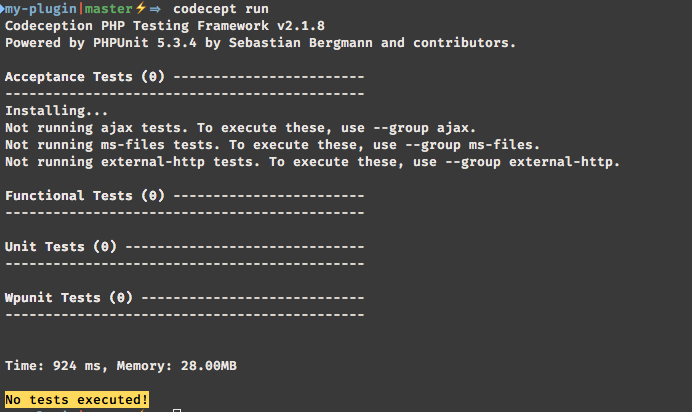
To make sure everything is working as intended I run Codeception
./vendor/bin/codecept run
and confirm the testing suite is properly setup:
[ ](http://theaveragedev.local/wp-content/uploads/2016/05/2016-05-16-at-18.36.png)

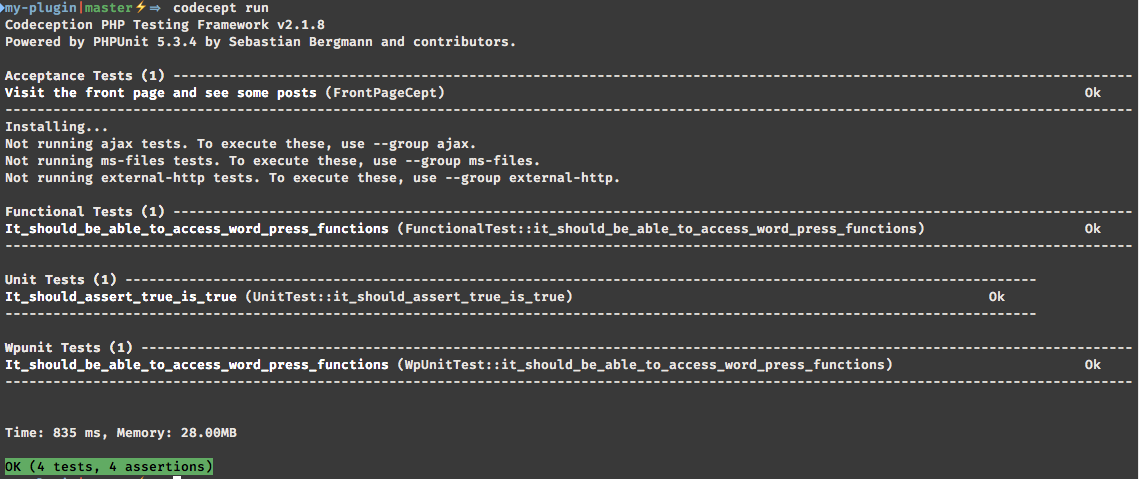
Time to add some code to each suite to make sure tests are working too:
wpcept generate:test unit Unit
wpcept generate:wpunit wpunit WpUnit
wpcept generate:wpunit functional Functional
wpcept generate:cept acceptance FrontPage
The tests are elementary in coding terms and I'm not pasting them; suffice to say the suite runs as expected:
[ ](http://theaveragedev.local/wp-content/uploads/2016/05/2016-05-16-at-18.52.png)
